HyperCX Overview
Categories:
Welcome to HyperCX, your HCI solution for Private and Public cloud 🚀
This page provides a high-level overview of the HyperCX cloud model, architecture, and components. To familiarize yourself with HyperCX and build an evaluation environment, we strongly recommend you follow the tutorials for creating a PoC account in our Try HyperCX. For a description of the steps needed to start with a production environment, in one of our public clouds or build your own HyperCX cloud, please contact us via email to support@virtalus.com.
HyperCX is a powerful, but easy-to-use, open source platform to build and manage enterprise clouds and virtualized datacenters. It combines existing virtualization technologies with advanced features for multi-tenancy, automatic provision and elasticity on private and public environments. It unifies management of IT infrastructure and applications, preventing vendor lock-in and reducing complexity, resource consumption, and operational costs.
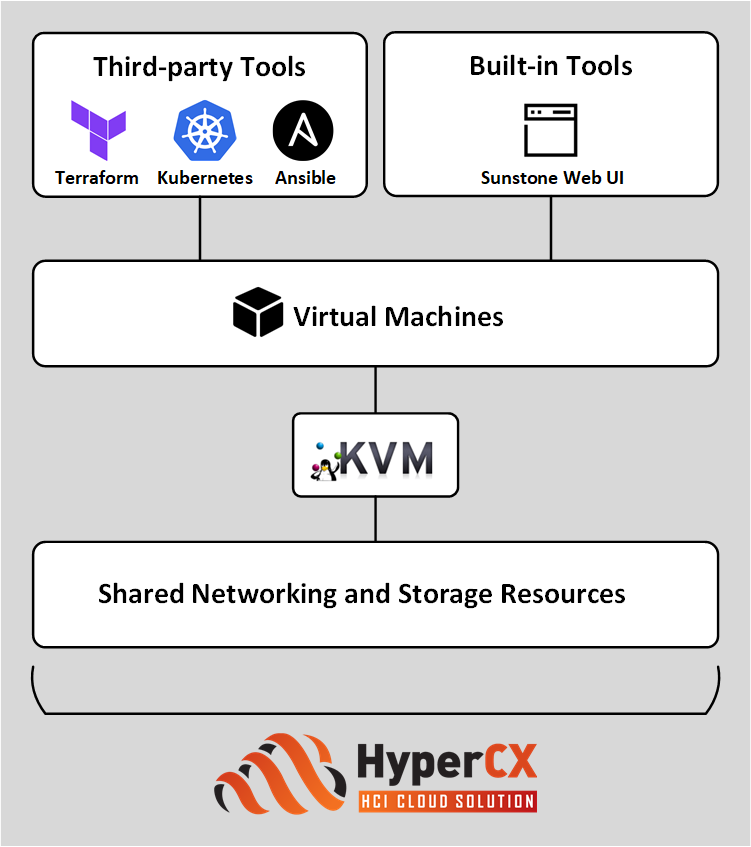
HyperCX Infrastructure and Management
A HyperCX infrastructure can be deployed both on-premise (at the client’s facilities) and off-premise (at Virtalus’ facilities). Virtualization of client instances is based on the open-source KVM hypervisor, while the management infrastructure uses LXC containers.
Cloud resources are orchestrated by one or more HyperCX Front-ends. The Front-end manages and interacts with components such as daemons, services, and interfaces to provide deployment, orchestration, monitoring, and lifecycle management of infrastructure resources. It also persists the state of the cloud in a designated SQL database.
The system is modular and designed for flexibility. It supports various deployment models and storage configurations, including:
- Block-backed storage (e.g., Ceph).
- Shared-backed storage (e.g., GlusterFS, OCFS2).
- Local-backed storage (e.g., Software RAID, Hardware RAID).
Virtualized Applications
HyperCX can manage both single virtual machines and complex multi-tier services composed of multiple VMs that require advanced elasticity rules and dynamic adaptability. Elements in the HyperCX infrastructure (such as virtual machines, networks, and appliances) are created from images and templates. Users can modify existing templates or create new ones as needed. Cloud administrators can share templates across their organizations, either directly or through the Appliances Marketplace, which offers pre-defined, fully functional templates ready for download and deployment—including multi-VM applications and virtual devices.
Containerized Applications through Kubernetes
HyperCX supports the automated deployment of Kubernetes clusters through the virtual appliance, OneKE, the OpenNebula Kubernetes Engine. This is an enterprise-grade, CNCF-certified Kubernetes distribution based on SUSE Rancher RKE2. In its basic configuration it comprises four Virtual Machines: the Kubernetes master node, a VNF node, a storage node, and a worker node. It can be configured as a multi-master cluster for high availability, and easily scaled up to include more worker nodes, either before deployment or dynamically during operation, by using elasticity rules. It includes features such as MetalLB load balancing, Multus and Cilium CNI plugins, and Longhorn storage. It is available as a multi-VM appliance on the Appliances Marketplace and can be installed in minutes using Sunstone Web UI.
Management Model and Tools
HyperCX’s management model provides multi-tenancy by design, offering different user interfaces depending on users’ roles within an organization, or the level of required expertise or functionality.
Management tools include the Sunstone Web UI, an easy-to-use visual interface for managing cloud infrastructure. The UI implements the full multi-tenancy features of the underlying system, allowing access to users with different roles, access, and management permissions.
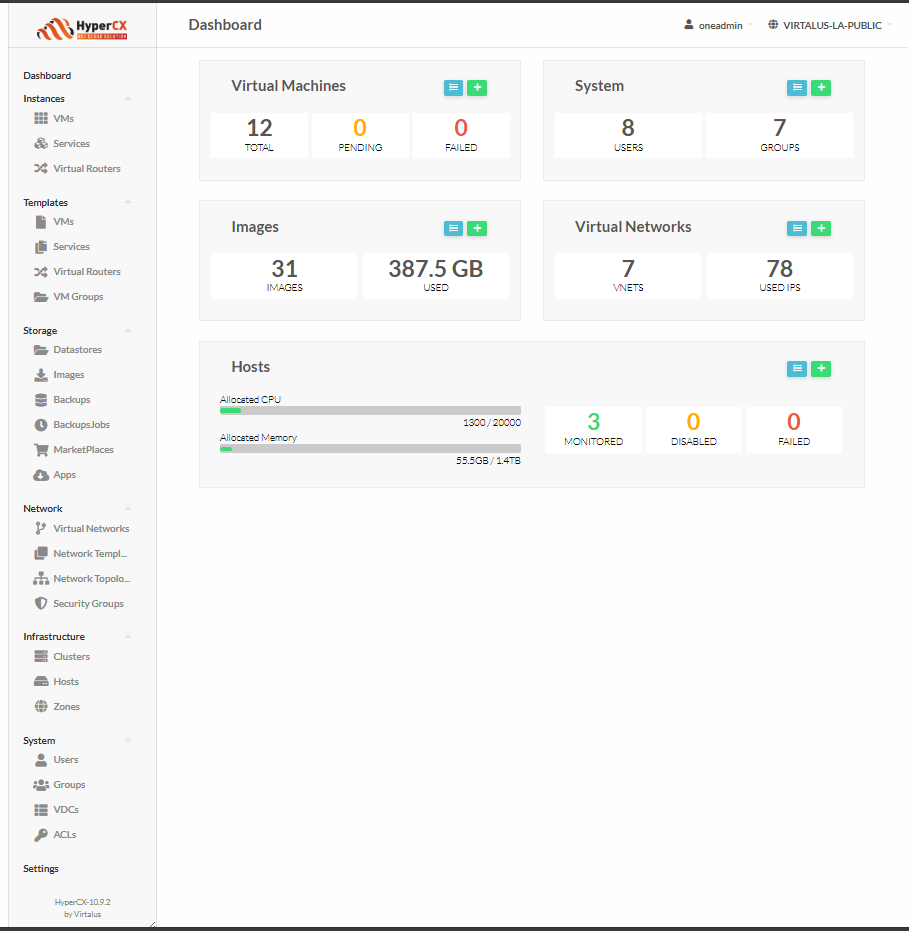
Among other features, Sunstone offers support for easily managing single VMs and multi-VM services, as well as datastores, Hosts and clusters; visualizing metrics and logs; and creating and editing templates for VMs, services, networks, and devices.
Cloud Access Models and Roles
HyperCX’s cloud provisioning model is based on Virtual datacenters (VDCs) designed to dynamically provision infrastructure resources in large multi-datacenter and multi-cloud environments to different customers, business units, or groups.
A key management task in HyperCX infrastructure environment involves determining who can use the cloud administrative interfaces, and what tasks those users are authorized to perform. The person with the role of cloud service administrator is authorized to assign the appropriate rights required by other users. HyperCX includes three default user roles, based on their permissions and allowed views: cloud users, cloud group admins, and cloud admins. HyperCX further offers the possibility of designing custom roles. The HyperCX documentation provides general guidelines and best practices for determining cloud user roles, please see Cloud Access Models and Roles for more information.
The HyperCX Model for Cloud Infrastructure Deployment
A standard HyperCX cloud architecture consists of:
- The Cloud Infrastructure, composed of one or more workload Clusters that include hypervisor nodes and the storage system.
- The Cloud Management Stack, composed from 1 to 3 Front-end nodes, the Infrastructure VRouter, and the Monitor Proxy (required to communicate with Virtalus Central Monitoring).
All HCI infrastructure components reside in the same geographical location. They are interconnected through 2 switches configured in high availability (HA), supporting internal storage and node management, as well as private and public VM communications.
In general, there are two types of cluster models that can be used with HyperCX:
- HCI Customized Clusters are typically deployed on-premises or off-premises to meet specific requirements. Compute nodes can also act as storage nodes.
- Non-HCI Customized Clusters are also deployed on-premises or off-premises but are designed such that storage is separated from compute; none of the compute nodes host storage components for workload.
HyperCX Components
OpenNebula was designed to be easily adapted to any infrastructure and easily extensible with new components. The result is a modular system capable of implementing a wide range of cloud architectures and integrating with multiple datacenter services.
HyperCX builds upon this foundation, bringing it all together into a fully integrated HCI architecture with its own customizations.
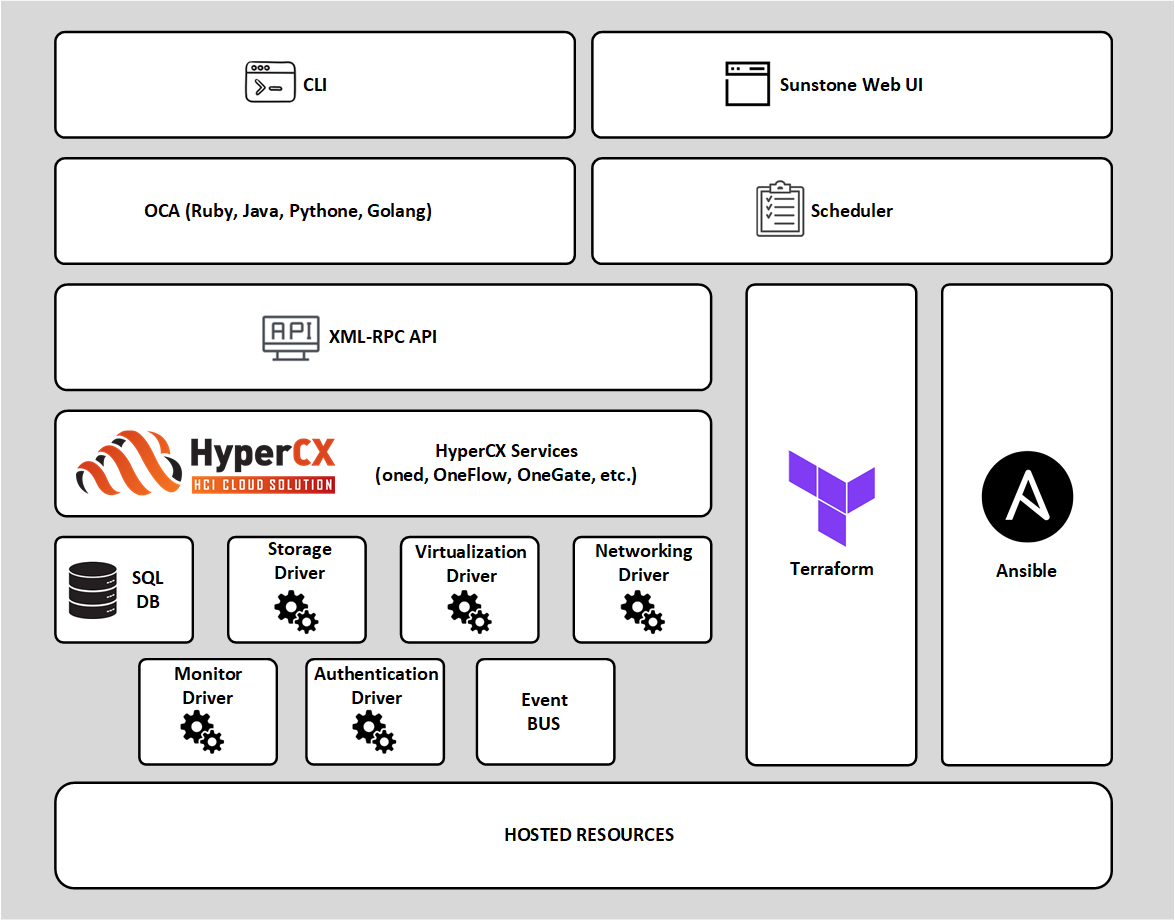
Main components of an HyperCX installation:
- HyperCX Daemon (
oned): Based on the OpenNebula Daemon,onedis the core service of the cloud management platform. It manages the cluster nodes, Virtual Networks, storages, groups, users, and their Virtual Machines; and provides the XML-RPC API to other services and end users. - Database: HyperCX persists the state of the cloud to a user-selected SQL database. This key component should is monitored and tuned for best performance, following best practices for the particular database product.
- Scheduler: The HyperCX Scheduler framework is a modular system for optimal resource allocation. It is started automatically with the HyperCX Daemon, and can apply different scheduling algorithms to allocate Hosts, storage, and Virtual Networks.
- Monitoring Subsystem: The monitoring subsystem is implemented as a dedicated daemon (
onemonitord) launched by the HyperCX Daemon. It gathers information relevant to the Hosts and the Virtual Machines, such as Host status, basic performance indicators, Virtual Machine status and capacity consumption. - OneFlow: The OneFlow service orchestrates multi-VM services as single entities, defining dependencies and auto-scaling policies for the application components. It interacts with the HyperCX Daemon to manage the Virtual Machines (starts, stops), and can be controlled via the Sunstone WebUI or over the CLI.
- OneGate: The OneGate server allows Virtual Machines to pull and push information from/to HyperCX, enabling users and admins to gather metrics, detect problems in their applications, and trigger OneFlow elasticity rules from inside the VMs.
These are HyperCX’s system interfaces:
- Sunstone: HyperCX Graphical User Interface (WebUI) intended for both end users and administrators to easily manage all HyperCX resources and perform typical operations.
- CLI: HyperCX includes a comprehensive set of Unix-like command-line tools to interact with the system and its different components.
- XML-RPC API: This is the primary interface for HyperCX, through which you can control and manage any HyperCX resource, including VMs, Virtual Networks, Images, Users, Hosts, and Clusters.
- HyperCX Cloud API: HyperCX use the OpenNebula Cloud API (OCA), providing a simplified and convenient way to interface with the HyperCX core XML-RPC API, including support for Ruby, Java, Golang, and Python.
- HyperCX OneFlow API: This is a RESTful service to create, control, and monitor services composed of interconnected Virtual Machines with deployment dependencies between them.
The interactions between HyperCX and the underlying cloud infrastructure are performed by specific drivers. Each one addresses a particular area:
- Storage: This HyperCX core layer abstracts storage operations (e.g., clone or delete) implemented by specific programs, which can be replaced or modified to interface special storage backends and filesystems.
- Virtualization: HyperCX implements interactions with its hypervisor, by using custom programs to boot, stop, or migrate a Virtual Machine. This allows you to specialize each VM operation so as to perform custom operations.
- Monitoring: Monitoring information is also gathered by external probes. You can add additional probes to include custom monitoring metrics that can later be used to allocate Virtual Machines, or for accounting purposes.
- Authorization: HyperCX can also be configured to use an external program to authorize and authenticate user requests, allowing you to implement any access policy to cloud resources.
- Networking: The hypervisor is also prepared with the network configuration for each Virtual Machine.
- Event Bus: A generic message bus where HyperCX publishes resource events. The message bus is used to synchronize HyperCX services as well as to integrate custom applications.
The HyperCX documentation provides a summary of its key features. The Platform Notes list the infrastructure platforms and resources supported by each HyperCX release.