Getting Started
Importing an appliance
With HyperCX GUI existing appliances can be easily downloaded
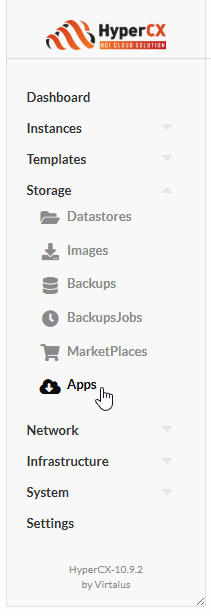
- Appliances can be accessed under Storage 🡪 Apps.
Once in the Apps UI select an existing appliance and click on the appliance to view its description.
Now click on
 icon to start the template creation process.
Enter the template name, its Image name and click on
 .
.Wait for the Image to be downloaded. It’s status can be checked by:
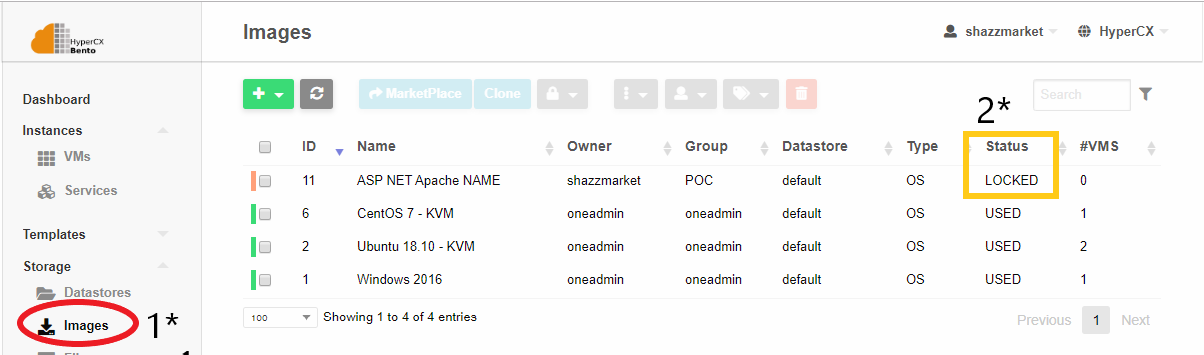
Accessing Storage -> Images.
The status of the image will be
LOCKEDwhile the download is in progress.Once the image is downloaded its status is changed from
LOCKEDtoREADY, only then this appliance can be instantiated on the cluster.
 Tip
Tip
Every time a marketplace appliance is downloaded, a new image and template will be created.Appliance categories
Appliances offered by HyperCX can be catalogued into 4 main groups:
Open Source Operating Systems for Virtual Machines
HyperCX provides the most common Linux Operating Systems already preinstalled and contextualized so they can integrate with the platform. Operating systems in this category use the KVM hypervisor, so they are considered Virtual Machines. These are the existing open source distributions available on the marketplace as VMs:
- Debian
- Ubuntu
- CentOS
- AlmaLinux
- Rocky Linux
- Red Hat Enterprise Linux
- SUSE Enterprise Linux
- FreeBSD
- Fedora
- Devuan
- Alpine Linux
- Amazon Linux
- OpenSUSE
- Ttylinux
- Oracle Linux
Tip
Although root password can be modified on the template (or during instantiation) for HyperCX open source operating systems, both in VMs and containers (described below), this is not a recommended approach. Instead, users are encouraged to configure their public key(s) on the user’s settings and connect via passwordless ssh to the VM. Warning
Some of these appliances require OS licensing, like RHEL, SLES. HyperCX does not provide license for these appliances. It is applied the Bring Your Own License model.Windows Virtual Machines
Some Windows versions are also available on the marketplace. These appliances will provide a trial period between 4 to 6 month, but the license is to be configured by the end user. Currently, the following versions of Windows can be found on the marketplace:
- Microsoft Windows 10
- Microsoft Windows 11
- Microsoft Windows Server 2003 R2
- Microsoft Windows Server 2012
- Microsoft Windows Server 2016
- Microsoft Windows Server 2019
- Microsoft Windows Server 2022
- Microsoft Windows Server 2025
 Important